
Skills planning. Succession planning. Multi-year forecasting. Compensation cycles. Custom dashboards. By the time you reach the bottom of the feature list, it’s easy to forget what you came looking for: a better way to plan headcount.
Much of the headcount planning software on the market was built with larger organizations in mind. These companies have dedicated FP&A teams, analysts to build and run models, bigger budgets and months to spend on implementation. At that scale, the complexity makes sense.
But if your company has 20 to 250 employees, you probably need something different. More software isn't necessarily better software. This guide will help you work out which features actually matter, which ones you can skip and what to look for in a tool that fits the company you have today.
At a company with 20 to 250 employees, headcount planning is often one of many things the COO, Head of People, CFO or founder has to manage. There may be no analyst building models in the background or an administrator dedicated to running the software.
That leads to a different set of priorities:
With those priorities in mind, the right software is less about how much it can do and more about how closely it’s tailored to what you actually need.
So what should you look for when comparing your options? These five features matter most:
Look for a view that maps roles and reporting lines directly to their costs. You should be able to move through the org and see the financial picture without switching between an org chart and a separate cost file.
Check what the platform includes beyond base salary. Benefits, tools and onboarding costs should feed into the total, so you can see the full cost of individual roles and entire teams.
The software should let you create multiple versions of the org, change roles or headcount within each and compare the resulting structure and costs side by side before anything changes in the live org.
Look at how long it takes to go from signing up to working with your own data. For a mid-market company, that should be measured in days rather than months.
A COO or Head of People should be able to build scenarios, change assumptions and compare results without an analyst or consultant operating the platform for them.
You may not find all five at the top of every feature list. Together, though, they tell you a lot about whether a tool fits the way your team plans headcount.

The workforce planning software category on G2 is broad, covering tools for headcount and expense planning, compensation, hiring workflows, workforce analytics and more. Not all of that will be relevant when headcount planning is the main job you need the software to do.
At 20 to 250 employees, three warning signs are worth watching:
None of these makes a platform a bad choice. They’re simply signs that you should look a little closer before committing to it.
A feature list can tell you what a platform offers. These five questions will tell you more about what it will be like to use:
Can I be using this productively within one week?
Pay attention to how specific the answers are, too. “It depends” is normal for some questions, but the vendor should still be able to explain what implementation looks like for a team like yours, which data you’ll need to provide and what you can do without outside support.
Ask to see those workflows during the demo rather than relying on the feature list alone. By the end, you should have a clear picture of what happens between signing up and making your first real headcount decision.
The two categories overlap, but they help with different levels of planning. Headcount planning software focuses on the number, cost and structure of roles: who you have, who you need, what they cost and what changes when you hire, cut or restructure.
Workforce planning software takes a broader view. Alongside headcount, it can cover skills planning, succession planning and longer-term workforce strategy. It’s designed to answer questions about how the workforce needs to evolve over time, not only which roles need to change now.
For companies with 20 to 250 employees, headcount planning software is often the more immediate need. If you’re deciding which roles to add, what they’ll cost or where to restructure, those are headcount planning questions.
Cortextual brings org visibility, workforce costs and scenario modeling into the same platform. Cost intelligence brings the cost of roles, teams and departments into your live org chart, while the scenario builder lets you model hires, cuts and restructures and compare their impact before making a change.
The headcount planning market also includes broader people platforms, which combine workforce planning with areas like compensation and people analytics. Cortextual has a narrower focus, centered on understanding your current org, its costs and the impact of different headcount decisions.
That also means there are things Cortextual isn’t designed to replace:
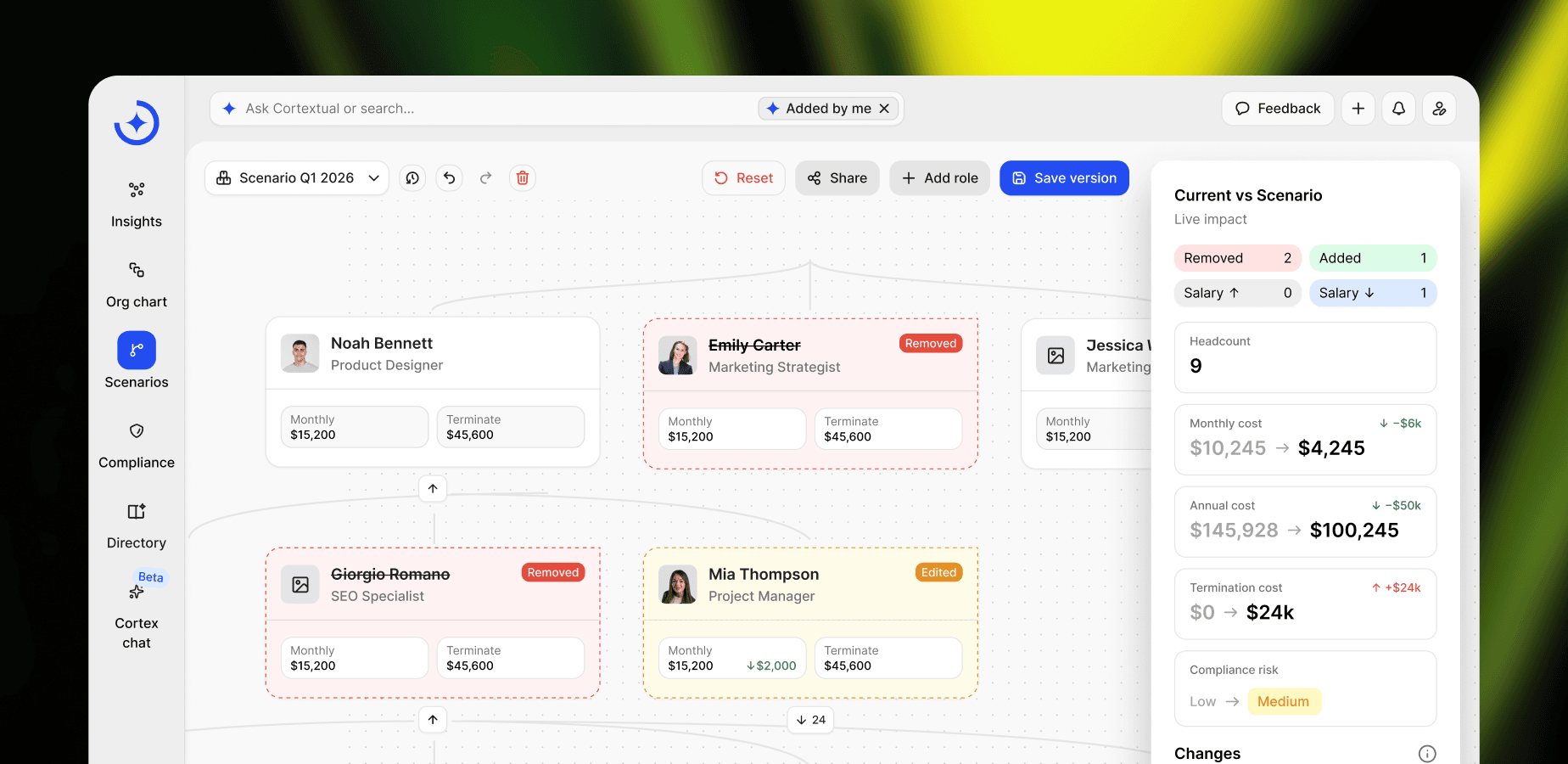
You can bring in your existing workforce data and connected sources without needing a dedicated analyst to run the planning process. The Free plan lets you start with your own org data and one scenario, while Pro adds unlimited scenarios, full cost visibility and all connected sources.
Headcount planning software helps organizations understand their current workforce and plan changes to it. It brings together headcount, org structure and cost data so you can see what your workforce costs today and model the impact of hiring, cutting or restructuring before making a decision.
The best headcount planning software is one that matches the way your team plans today. Look for role and team-level cost visibility, scenario modeling you can use without specialist help, quick implementation and pricing that makes sense at your current headcount. Broader workforce planning platforms may offer more, but those extra capabilities only matter if you need them.
An HRIS stores employee data and manages core HR administration. Headcount planning software uses workforce and cost data to help you plan what comes next, from adding roles to restructuring teams. You may use both: one to manage your workforce and the other to plan how it could change.
For occasional, simple headcount decisions at a small or relatively stable company, a spreadsheet may be all you need. As changes become more frequent or you need to compare multiple scenarios, dedicated software makes it easier to keep your org, costs and different options up to date and in one place.
Your hub for research, frameworks, and practical guidance on workforce transition, organizational knowledge, AI adoption and more.